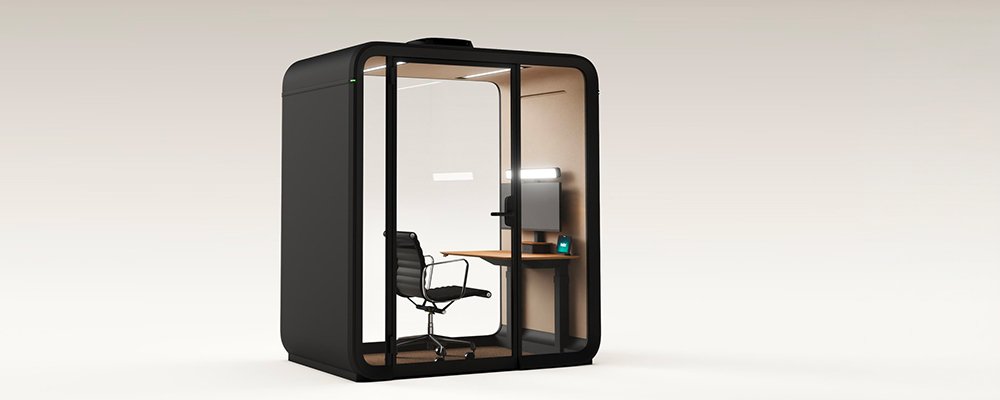
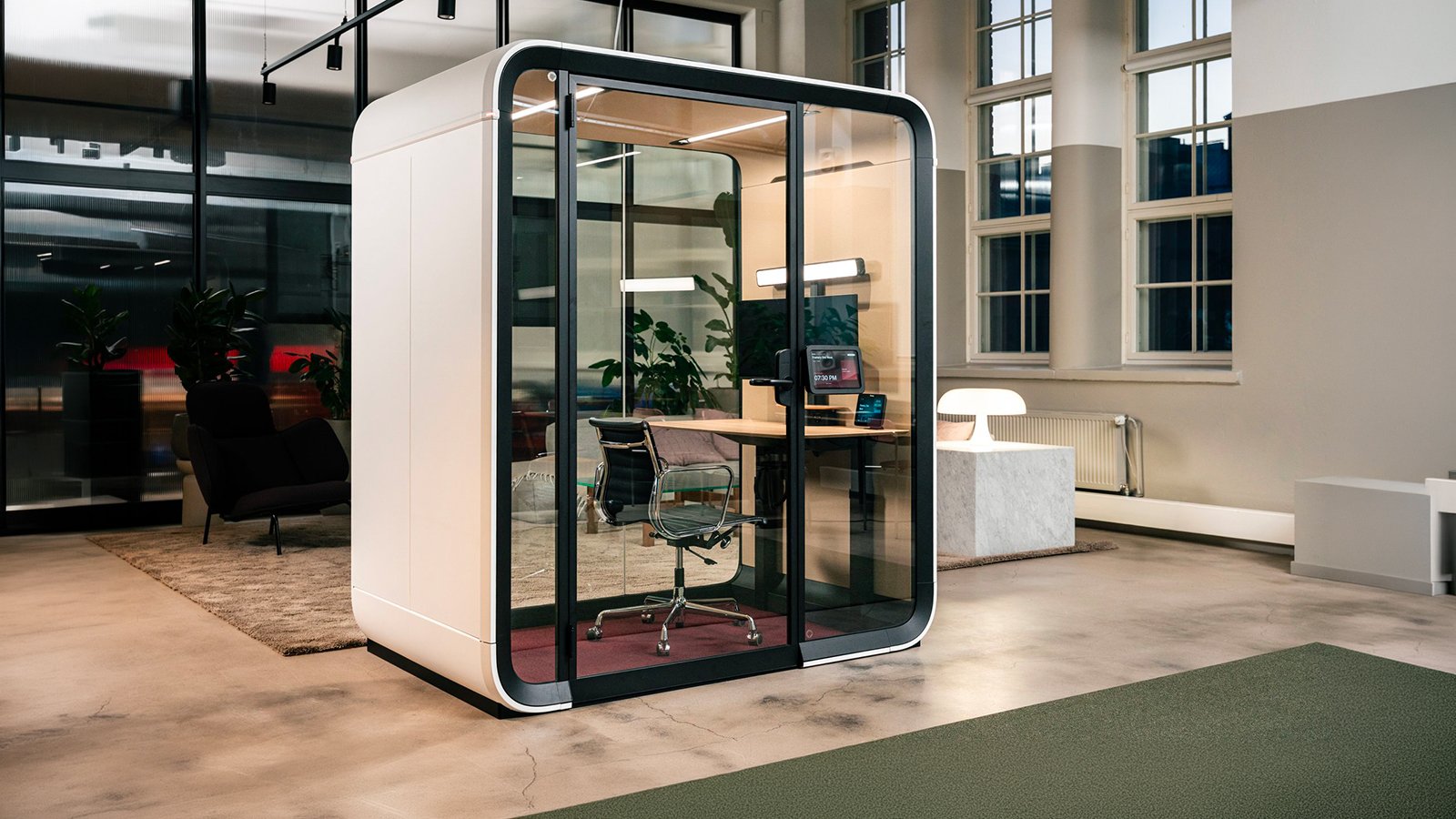
One Work pod by Framery with its glass door closed on a British open-plan floor

Assessed by an IBCCES expert board: One Work, Framery's Certified Autism Resource pod

Framery
Complete office pod
Framery One Work Available now Complete office pod
£ 18,486

Let's discuss your project

Trade terms for professionals and design studios

An IBCCES expert board has looked at this pod with one question in mind: does it serve people with autism? Framery carries the Certified Autism Resource designation, earned after that board certified its product aligns with the competency areas set for the needs of individuals with autism. It says the room can be tuned by the person inside it, and in the field of soundproof office pods One Work is where that tuning goes furthest.

The controls are concrete. Two lighting presets at 4000 K, Standard, up to 375 lux across the desk, and Video call, up to 500 lux reaching the face, both adjustable on an 8-inch touchscreen that sits on the table rather than the wall. The airflow has a direct mode and an indirect one. ISO 23351-1 rates it Class A: 30 dB off the speech level. Framery built it as a one-person workstation pod for long sessions of focused work, and it stands next to the open-plan floor rather than away from it.

What you add later matters as much: privacy film in Solid, Line or Grid, fitted by professional installers; a smart lock for controlled entry; a kickplate of 38 × 54 cm (15 × 21.3 in), announced, for the lower inner panel. Base, Essentials and Essentials+ differ in the desk and in the exterior Room Display, and none of them includes a chair. La Mercanti asks who on the floor will use the pod most before placing it, so the quietest position goes to the person who needs it, not to the nearest socket.

Technical information based on data declared by the manufacturer.
  • Collection: Framery One Work
  • Manufacturer: Framery Oy, Tampere, Finland
  • Type: smart soundproof workstation pod for one person, presented at Orgatec 2026
  • Soundproofing: 30 dB speech level reduction, Class A under ISO 23351-1; interior without echo
  • Sound masking: Framery Office Sound Masking System built in, effective radius 5 m (16 ft) outside the pod
  • Ventilation: maximum 53 l/s (112 CFM), in use 31 l/s (65 CFM), standby 24 l/s (51 CFM); air fully renewed every minute; direct or indirect flow; sensors for occupancy, temperature and humidity; self-refresh after use
  • Lighting: dual ceiling light 4000 K up to 375 lux on the desk; video light 4000 K up to 500 lux on the face; Standard and Video call presets, manual adjustment
  • Controls: 8-inch touchscreen on the table; mmWave radar presence detection; occupancy lights in the upper exterior corners: green vacant, yellow booking about to start, red occupied
  • Connectivity: built-in 4G with SIM or Wi-Fi 802.11 a/b/g/n/ac; automatic over-the-air updates; anonymous occupancy data in Framery Connect
  • Booking: Framery App and company calendar; automatic walk-in reservation on entry; extension from the touchscreen; set as bookable or walk-in only; optional exterior Room Display
  • Power: 48.5 W at default settings, 101 W maximum, 14.2 W standby; input 230 VAC 10 A Schuko (NEMA 5-15P North America, 16 A India); outlet 120-230 VAC 6 A; USB-C PD 140 W
  • Sockets: 2 on the desktop and 3 beneath; optional 2 USB-C PD 140 W ports and 1-2 LAN ports
  • Dimensions: exterior 232.9 × 196.4 × 129.2 cm (91.7 × 77.4 × 50.9 in) h × w × d, with air filter housing; interior 209.7 × 176.6 × 118 cm (82.6 × 69.5 × 46.5 in); doorway 209.7 × 96.6 cm (82.6 × 38 in), 180° swing, left-hand hinge fixed; threshold 1.25 cm (0.5 in)
  • Footprint and weight: 2.5 m² (27 sq ft); 488 kg (1,076 lb)
  • Desk: 116.8 × 60 cm (46.9 × 23.6 in), 60 kg (132.3 lb) load; fixed at 70 cm (27.6 in) or electric 68.7-118.7 cm (27-46.7 in); birch plywood laminated white or anti-fingerprint black, oak or walnut veneer
  • Screens: single stand for one monitor up to 40 inches as standard; dual upgrade for two monitors up to 27 inches, landscape or portrait; monitors not included
  • Seating: not included
  • Layouts: Base (fixed desk, standard colours) · Essentials (electric desk, all colours) · Essentials+ (electric desk, exterior Room Display with full tablet kit)
  • Materials: exterior panels in matt powder-coated steel; frame and door frame in matt black aluminium; acoustic laminated glass 4 + 4 mm (0.16 + 0.16 in); lightweight steel chassis with sound-absorbing PET structure; interior panels in PET with recycled polyester fabric; Gabriel Tonal upholstery fabric; Fletco carpet, antistatic and stain-resistant; custom black metal handle
  • Colours: 8 exterior Ultramatt: White RAL 9016, Black RAL 9005, Grey S 7500-N, Navy S 7020-R90B, Sand S 2010-Y20R, Powder Blue 3421-R86B, Winter Moss S 7010-G10Y, Blush 2728-R01B; Tonal interiors: Pure Gray, Arctic Blue, Sand, Rouge; carpet: Light Gray, Dark Blue, Champagne, Grape
  • Accessories: dual-monitor stand; privacy film Solid, Line or Grid; Room Display Kit; exterior tablet mount; smart lock; USB-C and LAN ports; reusable movability kit; seismic kit; additional fire-safety measures; kickplate 38 × 54 cm (15.0 × 21.3 in), announced
  • Smart office: Framery Connect, Framery App, Space Overview, Room Display, Room Sensor
  • Power cable: 7 m (23 ft), from the floor or the roof, exit on the right-hand side of the pod
  • Shipping: two crates: 223 × 72 × 115 cm (87.8 × 28.3 × 45.3 in), 367 kg (809 lb); 227 × 77 × 144 cm (89.4 × 30.3 × 56.7 in), 209 kg (461 lb)
  • Safety: seismic testing to ASCE 7-16, designed for floor anchoring; doorway and threshold declared by Framery to be in accordance with ADA guidelines
  • Certifications: UL GREENGUARD Gold; UL 962 for North America; cULus; CE; ISO 9001 and ISO 14001 (Bureau Veritas) held by the company; EPD, HPD, Declare and Möbelfakta; Certified Autism Resource by IBCCES; EcoVadis Gold
  • Origin: Finland
La Mercanti Srl — trusted supplier for design and contract projects since 1997.
San Benedetto del Tronto (AP), Italy · +39 0735 753833 · info@lamercanti.com
Supply, quotations, specifications and project support across the UK and worldwide.

Tell us which finishes you'd like to assess

£ 170

Fully redeemable against your first order

FAQ

Why does Framery build One Work to be repaired rather than thrown away?

Because of a figure Framery cites on its own data sheet: roughly 80% of furniture ends up in landfill. The company's answer is a pod engineered to deliver decades of service, with every component replaceable and the whole unit repairable and refurbishable rather than scrapped. The structure is kept to mono-materials, steel, aluminium, glass and acoustic PET, so that recycling at end of life is straightforward. For a buyer the consequence is a different depreciation story: a pod that can be moved, repaired and upgraded outlives the floor plan it was bought for.

Is there room to stand up and take a call inside One Work?

Yes. The interior height is 209.7 cm (82.6 in) under an exterior of 233 cm (91.7 in), so a person stands upright with headroom to spare and a call can be taken on your feet while the desk stays set for sitting. Framery states it plainly: you can stand, and you can phone standing. Together with 176.6 cm (69.5 in) of interior width it is the largest single-person pod the company makes, measured inside, which is the measurement that matters once the door is shut.

What does Framery Connect tell a facilities team?

How the pod is used, not who used it. Framery Connect is the workplace management platform that receives the occupancy data from each pod, when it was occupied and how often, and keeps the history. Framery describes its purpose in one phrase: to validate the return on the investment. In practice the dashboard shows whether a floor is short of quiet rooms or over-supplied with them, which is the number a facilities team needs before buying a second pod or moving the first. The data travel over the pod's own mobile link or the office network, and the platform keeps the history for as long as the pod is in service.

Does the pod record who is working inside it?

No. Framery states that no identifiable user data is collected and that only workspace occupancy is tracked: the pod knows that it is occupied, when and for how long, and nothing about the person. The radar that senses presence is not a camera, and the occupancy figures sent to Framery's management platform are anonymous. For HR, and for anyone who answers to a works council, the distinction is the whole point. Usage statistics can justify the next pod; they cannot be turned into a timesheet.

Which exterior colours can One Work be ordered in?

Eight, all in Framery's Ultramatt finish on powder-coated steel. Three are standard and the only ones offered on the Base layout: White, Black and Grey (RAL 9016, RAL 9005, S 7500-N). The other five are given in NCS notation: Navy S 7020-R90B, Sand S 2010-Y20R, Powder Blue 3421-R86B, Winter Moss S 7010-G10Y and Blush 2728-R01B. Stating the colour as a code rather than a name is what lets an interior designer match the pod to a wall or a carpet already on the drawings, and it is the code, not the swatch name, that belongs on the order.

Your first session in Framery One Work: light, air and desk in five settings

Everything in the pod is set from the 8-inch touchscreen on the desk. Five settings for the first half hour, each resting on a figure Framery declares for One Work, and one of them happens after you leave.

Pick the lighting preset

Framery One Work offers two presets at 4000 K. Standard puts up to 375 lux on the desk, which is reading and writing light; Video call sends up to 500 lux toward the face, which is what a camera needs. Both can be adjusted by hand. Start the session on the preset that matches the next hour, and change it when the call starts rather than squinting through it.

Point the air, or don't

The airflow can be set direct or indirect. Direct means the stream reaches you; indirect means the room is ventilated without a draught on your neck. The pod already reads occupancy, temperature and humidity and adapts the volume of air on its own while you work, so the choice is about comfort rather than quantity. A manual override sits on the same screen.

Set the desk before you sit

The standard desk is fixed in height. With the electric upgrade it travels from 68.7 to 118.7 cm (27 to 46.7 in), which covers seated work and standing work. Set it once, before the laptop and the papers land on the 116.8 × 60 cm (46.9 × 23.6 in) top, and the rest of the session does not turn into a negotiation with the furniture.

Keep the screen on the table

The touchscreen is a panel on the desk, not a pad on the wall. It carries the light, the air and the booking: if the session is running long, the reservation is extended from there without leaving the chair. The two power outlets on the desktop and the three underneath keep the laptop and the phone charged for the whole stretch.

Leave, and let it breathe

After use the pod refreshes itself at a higher ventilation speed, then settles back to its resting flow once the room is clear. The air inside is fully renewed every minute while you work, so the next person does not inherit your hour. Nothing to switch off: the radar notices you have gone and the pod does the rest.